Understand. Then respond.
Keep English originals, Korean translation and suggested talking points beside Google Meet, Zoom web or Microsoft Teams web in Chrome.
Follow English meetings with Korean translation. Prepare the words you want to say, grounded in your own experience.
See how to start↗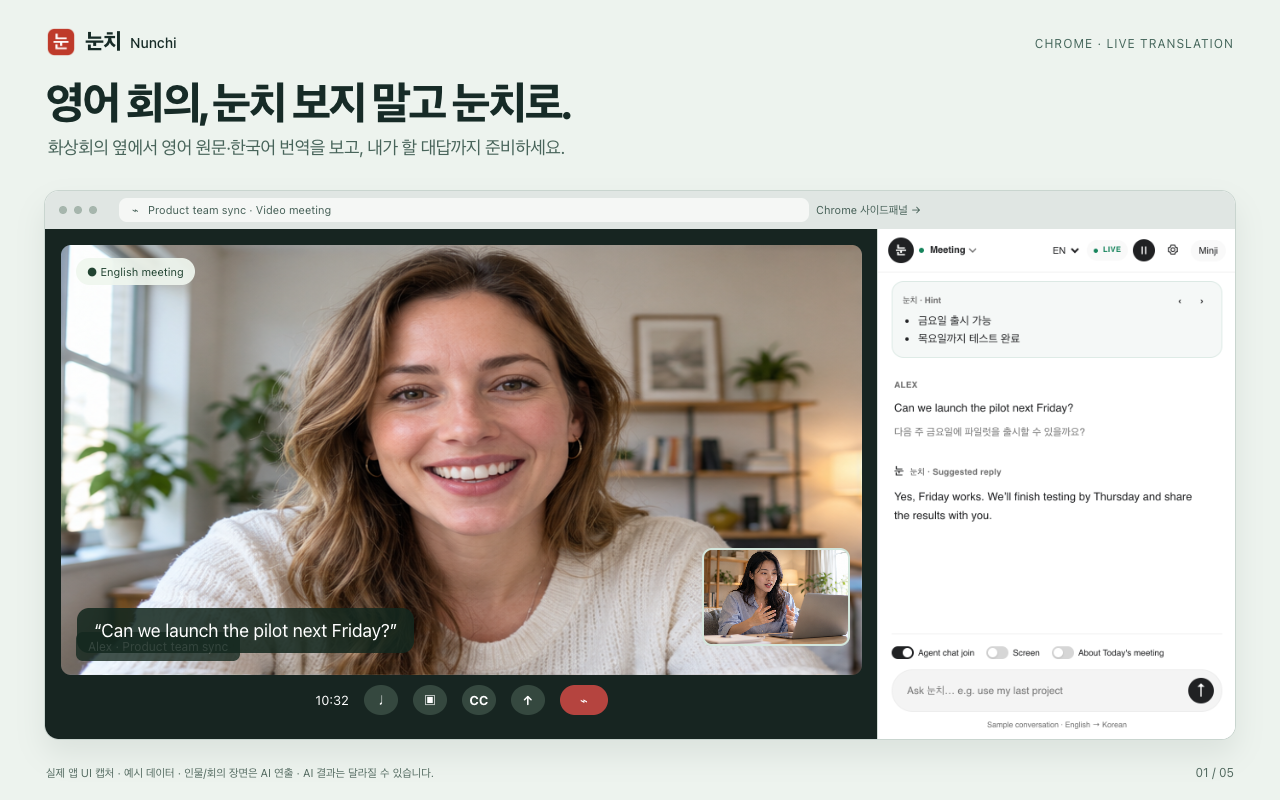
Keep English originals, Korean translation and suggested talking points beside Google Meet, Zoom web or Microsoft Teams web in Chrome.
Add your resume, project notes or company context to Knowledge. Use Meeting simulation to practise interviews and presentations with feedback.
Revisit saved transcripts, summaries and next steps in the Meeting Board. The separate mobile web app supports face-to-face conversations using the device microphone.
Select a step to explore the product flow.
Keep English originals, Korean translation and suggested talking points beside Google Meet, Zoom web or Microsoft Teams web in Chrome.
Sign in with Google and check account access.
Add relevant knowledge and describe your meeting.
Start in the Chrome side panel or open the mobile web app.
Review current features, permissions and account requirements in the Store and in the product.
Web meetings in Chrome are the main side-panel workflow. Desktop meeting audio may require the separate Mac helper and configuration.
Meeting simulation offers questions, feedback and suggested phrasing. Voice features depend on your device, browser and settings.
Cloud AI may receive meeting text and relevant knowledge. AWS Transcribe receives audio when selected. Check participant consent and permissions. Temporary meeting mode does not save records.